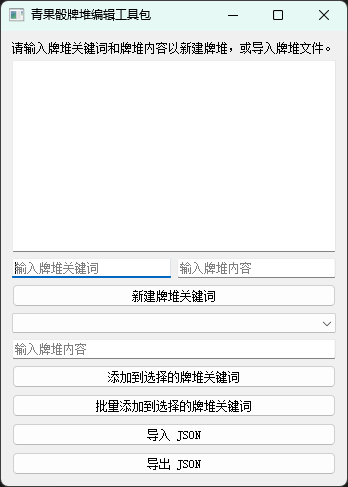
为了方便快速便捷排队和批量添加内容,我自己用python编写了一个可以编辑json牌堆的可执行程序。目前支持快速新建牌堆和修改现有牌堆。软件简陋还请见谅。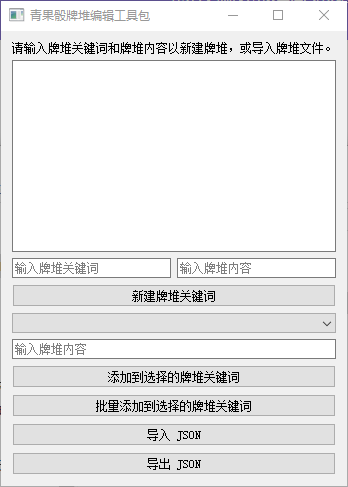
源码已贴上。
import sys
import json
from PyQt5.QtWidgets import (
    QApplication, QWidget, QVBoxLayout, QHBoxLayout,
    QComboBox, QLineEdit, QTextEdit, QPushButton,
    QFileDialog, QMessageBox, QLabel
)


class JsonEditor(QWidget):
    def __init__(self):
        super().__init__()
        self.json_data = {}
        self._is_modified = False          # 追踪是否有未保存的修改
        self._updating_display = False     # 防止 update_text_display 触发 handle_text_changed 递归
        self.init_ui()

    # ------------------------------------------------------------------ #
    #  UI 初始化                                                           #
    # ------------------------------------------------------------------ #
    def init_ui(self):
        self.setWindowTitle('青果骰牌堆编辑工具包')
        self.setMinimumSize(520, 600)      # 防止窗口被压缩变形

        main_layout = QVBoxLayout()

        # 提示文本(无数据时可见)
        self.placeholder_label = QLabel('请输入牌堆关键词和牌堆内容以新建牌堆,或导入牌堆文件。')
        main_layout.addWidget(self.placeholder_label)

        # JSON 预览区(支持手动编辑,实时双向同步)
        self.text_display = QTextEdit()
        self.text_display.textChanged.connect(self.handle_text_changed)
        main_layout.addWidget(self.text_display)

        # ---------- 新建关键词行 ----------
        input_layout = QHBoxLayout()

        self.new_key_input = QLineEdit(self)
        self.new_key_input.setPlaceholderText('输入牌堆关键词')
        input_layout.addWidget(self.new_key_input)

        self.new_value_input = QLineEdit(self)
        self.new_value_input.setPlaceholderText('输入牌堆内容')
        input_layout.addWidget(self.new_value_input)

        main_layout.addLayout(input_layout)

        # ---------- 操作按钮区 ----------
        button_layout = QVBoxLayout()

        self.add_button = QPushButton('新建牌堆关键词', self)
        self.add_button.clicked.connect(self.add_new_key_value)
        button_layout.addWidget(self.add_button)

        # 选择已有关键词
        self.existing_key_combo = QComboBox(self)
        button_layout.addWidget(self.existing_key_combo)

        # 向已有关键词追加内容
        self.append_content_input = QLineEdit(self)
        self.append_content_input.setPlaceholderText('输入牌堆内容')
        button_layout.addWidget(self.append_content_input)

        self.add_to_existing_button = QPushButton('添加到选择的牌堆关键词', self)
        self.add_to_existing_button.clicked.connect(self.add_to_existing_key)
        button_layout.addWidget(self.add_to_existing_button)

        self.batch_add_button = QPushButton('批量添加到选择的牌堆关键词', self)
        self.batch_add_button.clicked.connect(self.batch_add_to_existing_key_from_file)
        button_layout.addWidget(self.batch_add_button)

        # 删除已有关键词
        self.delete_key_button = QPushButton('删除选择的牌堆关键词', self)
        self.delete_key_button.clicked.connect(self.delete_selected_key)
        button_layout.addWidget(self.delete_key_button)

        main_layout.addLayout(button_layout)

        # ---------- 导入 / 导出 ----------
        import_export_layout = QHBoxLayout()

        self.import_button = QPushButton('导入 JSON', self)
        self.import_button.clicked.connect(self.import_json)
        import_export_layout.addWidget(self.import_button)

        self.export_button = QPushButton('导出 JSON', self)
        self.export_button.clicked.connect(self.export_json)
        import_export_layout.addWidget(self.export_button)

        main_layout.addLayout(import_export_layout)

        self.setLayout(main_layout)
        self.update_text_display()

    # ------------------------------------------------------------------ #
    #  关闭事件:提示未保存                                                #
    # ------------------------------------------------------------------ #
    def closeEvent(self, event):
        if self._is_modified:
            reply = QMessageBox.question(
                self, '未保存的修改',
                '当前有未保存的修改,确定要退出吗?',
                QMessageBox.Yes | QMessageBox.No,
                QMessageBox.No
            )
            if reply == QMessageBox.No:
                event.ignore()
                return
        event.accept()

    # ------------------------------------------------------------------ #
    #  文本框 → json_data(双向同步)                                      #
    # ------------------------------------------------------------------ #
    def handle_text_changed(self):
        if self._updating_display:
            return  # 由程序触发的刷新,不处理

        text = self.text_display.toPlainText().strip()

        if text == '':
            self.json_data = {}
            self._is_modified = True
            # 清空后刷新下拉菜单,但不重新设置文本(避免光标跳动)
            self.update_combo_box()
            self.placeholder_label.show()
            return

        try:
            parsed = json.loads(text)
            if isinstance(parsed, dict):
                self.json_data = parsed
                self._is_modified = True
                self.placeholder_label.hide()
                self.update_combo_box()
            # 非 dict 类型则忽略(用户还在输入中)
        except json.JSONDecodeError:
            pass  # 用户仍在输入,不强制报错

    # ------------------------------------------------------------------ #
    #  json_data → 文本框(单向刷新)                                      #
    # ------------------------------------------------------------------ #
    def update_text_display(self):
        self._updating_display = True
        if not self.json_data:
            self.text_display.clear()
            self.placeholder_label.show()
        else:
            self.text_display.setText(
                json.dumps(self.json_data, ensure_ascii=False, indent=4)
            )
            self.placeholder_label.hide()
        self._updating_display = False
        self.update_combo_box()

    # ------------------------------------------------------------------ #
    #  刷新下拉菜单                                                        #
    # ------------------------------------------------------------------ #
    def update_combo_box(self):
        current = self.existing_key_combo.currentText()
        self.existing_key_combo.blockSignals(True)
        self.existing_key_combo.clear()
        self.existing_key_combo.addItems(self.json_data.keys())
        # 尽量恢复之前选中的项
        index = self.existing_key_combo.findText(current)
        if index >= 0:
            self.existing_key_combo.setCurrentIndex(index)
        self.existing_key_combo.blockSignals(False)

    # ------------------------------------------------------------------ #
    #  新建牌堆关键词                                                      #
    # ------------------------------------------------------------------ #
    def add_new_key_value(self):
        key = self.new_key_input.text().strip()
        value = self.new_value_input.text().strip()

        if not key:
            QMessageBox.warning(self, '警告', '牌堆关键词不能为空!')
            return
        if not value:
            QMessageBox.warning(self, '警告', '牌堆内容不能为空!')
            return

        if key in self.json_data:
            self.json_data[key].append(value)
        else:
            self.json_data[key] = [value]

        self._is_modified = True
        self.new_key_input.clear()
        self.new_value_input.clear()
        self.update_text_display()

    # ------------------------------------------------------------------ #
    #  向已有关键词追加单条内容                                            #
    # ------------------------------------------------------------------ #
    def add_to_existing_key(self):
        key = self.existing_key_combo.currentText()
        if not key:
            QMessageBox.warning(self, '警告', '请先选择一个牌堆关键词!')
            return

        value = self.append_content_input.text().strip()
        if not value:
            QMessageBox.warning(self, '警告', '内容为空,添加失败!')
            return

        self.json_data.setdefault(key, []).append(value)
        self._is_modified = True
        self.append_content_input.clear()
        self.update_text_display()

    # ------------------------------------------------------------------ #
    #  删除选中的关键词                                                    #
    # ------------------------------------------------------------------ #
    def delete_selected_key(self):
        key = self.existing_key_combo.currentText()
        if not key:
            QMessageBox.warning(self, '警告', '请先选择一个牌堆关键词!')
            return

        reply = QMessageBox.question(
            self, '确认删除',
            f'确定要删除关键词「{key}」及其所有内容吗?',
            QMessageBox.Yes | QMessageBox.No,
            QMessageBox.No
        )
        if reply == QMessageBox.Yes:
            del self.json_data[key]
            self._is_modified = True
            self.update_text_display()

    # ------------------------------------------------------------------ #
    #  批量从 txt 文件添加到已有关键词                                     #
    # ------------------------------------------------------------------ #
    def batch_add_to_existing_key_from_file(self):
        key = self.existing_key_combo.currentText()
        if not key:
            QMessageBox.warning(self, '警告', '请先选择一个牌堆关键词!')
            return

        file_name, _ = QFileDialog.getOpenFileName(
            self, '选择文本文件', '', '文本文件 (*.txt)'
        )
        if not file_name:
            return

        try:
            with open(file_name, 'r', encoding='utf-8') as f:
                # 过滤空行,避免污染数据
                lines = [line for line in f.read().splitlines() if line.strip()]

            if not lines:
                QMessageBox.information(self, '提示', '文件中未找到有效内容(全为空行)。')
                return

            self.json_data.setdefault(key, []).extend(lines)
            self._is_modified = True
            self.update_text_display()
        except Exception as e:
            QMessageBox.critical(self, '错误', f'无法读取文件:{str(e)}')

    # ------------------------------------------------------------------ #
    #  导入 JSON                                                           #
    # ------------------------------------------------------------------ #
    def import_json(self):
        file_name, _ = QFileDialog.getOpenFileName(
            self, '打开 JSON 文件', '', 'JSON 文件 (*.json)'
        )
        if not file_name:
            return

        try:
            with open(file_name, 'r', encoding='utf-8') as f:
                data = json.load(f)

            if not isinstance(data, dict):
                QMessageBox.critical(self, '错误', 'JSON 文件顶层结构必须是对象({}),无法导入。')
                return

            self.json_data = data
            self._is_modified = False   # 刚导入,视为未修改状态
            self.update_text_display()

        except json.JSONDecodeError as e:
            QMessageBox.critical(self, '错误', f'JSON 文件格式不正确!\n错误信息: {str(e)}')
        except Exception as e:
            QMessageBox.critical(self, '错误', f'无法读取文件:{str(e)}')

    # ------------------------------------------------------------------ #
    #  导出 JSON                                                           #
    # ------------------------------------------------------------------ #
    def export_json(self):
        if not self.json_data:
            QMessageBox.warning(self, '警告', '当前没有任何牌堆数据,无法导出!')
            return

        file_name, _ = QFileDialog.getSaveFileName(
            self, '导出 JSON 文件', '', 'JSON 文件 (*.json)'
        )
        if not file_name:
            return

        try:
            with open(file_name, 'w', encoding='utf-8') as f:
                json.dump(self.json_data, f, ensure_ascii=False, indent=4)
            self._is_modified = False   # 已保存,重置修改标记
            QMessageBox.information(self, '成功', f'已成功导出到:\n{file_name}')
        except Exception as e:
            QMessageBox.critical(self, '错误', f'导出失败:{str(e)}')


# ------------------------------------------------------------------ #
#  程序入口                                                            #
# ------------------------------------------------------------------ #
if __name__ == '__main__':
    app = QApplication(sys.argv)
    editor = JsonEditor()
    editor.show()
    sys.exit(app.exec_())