OlivaGithub


利用webhook实时监控你的Github仓库 下载.opk
注意:插件编写测试时使用OlivOS 3.3.9+,低版本可能不支持。仓库地址,欢迎提交ISSUE。每次重载后即关闭Flask端口,在插件菜单重新点击开启即可。
插件特性
- 安装简单,仅需三步,一键式部署,不需要任何繁琐操作。
- 低延迟,高效率,利用
flask微框架编写。
- 个性化程度高,可自定义
host,path,port,以及任何事件的通报,支持转发多个好友与群聊。
运行截图
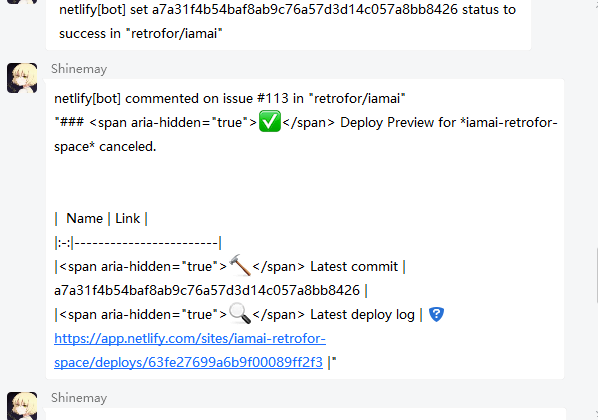
issue_comment
使用方法
- 将
OlivaGithub.opk放入./plugin/app/文件夹下,重载插件。
- 此时配置文件
config.json已经在./plugin/conf/OlivaGithub/生成,按需修改配置。
- 右键
OlivOS打开OlivaGithub插件菜单,单击开启。
配置示例
这是./plugin/conf/OlivaGithub/config.json的一个示例。通常来说host默认0.0.0.0,port默认3000,path默认webhook,你可以在配置文件里修改。
{
    "bot": {
        "hash": "43718c3b643*******ddfd95a0d013ae"
    },
    "settings": {
        "host": "0.0.0.0",
        "port": "3000",
        "path": "/webhook"
    },
    "sent": {
        "private": [
            2753364619
        ],
        "group": [
            971050440,
            10005856
        ]
    },
	"_star": {
		"deleted": "{sender[login]} unstarred \"{repository[name]}\" (Total {repository[stargazers_count]} stargazers)"
	},
    "issues": {
		"opened": "{sender[login]} {action} issue #{issue[number]} in \"{repository[full_name]}\"\n\"{issue[title]}\"\n{issue[body]}",
		"closed": "{sender[login]} {action} issue #{issue[number]} in \"{repository[full_name]}\""
	},
    "issue_comment": {
		"created": "{sender[login]} commented on issue #{issue[number]} in \"{repository[full_name]}\"\n{comment[body]}"
	},
    "commit_comment": "{comment[user][login]} commented on \"{comment[commit_id]}\" in \"{repository[full_name]}\"\n{comment[body}",
    "create": "{sender[login]} created {ref_type} ({ref}) in \"{repository[full_name]}\"",
    "delete": "{sender[login]} deleted {ref_type} ({ref}) in \"{repository[full_name]}\"",
    "deployment": "{sender[login]} deployed {deployment[ref]} to \"{deployment[environment]}\" in \"{repository[full_name]}\"",
    "_deployment_status": "deployment of {deployement[ref]} to \"{deployment[environment]}\" \"{deployment_status[state]}\" in \"{repository[full_name]}\"",
    "fork": "\"{forkee[owner][login]}\" forked \"{forkee[name]}\" (Total {repository[forks_count]} forkee)",
    "gollum": "{sender[login]} edited wiki pages in \"{repository[full_name]}\"",
    "member": "{sender[login]} {action} member {member[login]} in \"{repository[full_name]}\"",
    "membership": "{sender[login]} {action} member {member[login]} to team \"{team[name]} in {repository[full_name]}\"",
    "page_build": "{sender[login]} built pages in \"{repository[full_name]}\"",
    "ping": "ping from {sender[login]}",
    "public": "{sender[login]} publicized \"{repository[full_name]}\"",
    "pull_request": {
		"opened": "{sender[login]} {action} pull #{pull_request[number]} in \"{repository[full_name]}\"\n\"{pull_request[title]}\"\n{pull_request[body]}"
	},
    "pull_request_review": "{sender[login]} {action} {review[state]} \"review on pull #{pull_request[number]} in \"{repository[full_name]}\"",
    "pull_request_review_comment": "{comment[user][login]} {action} comment \"on pull #{pull_request[number]} in \"{repository[full_name]}\"",
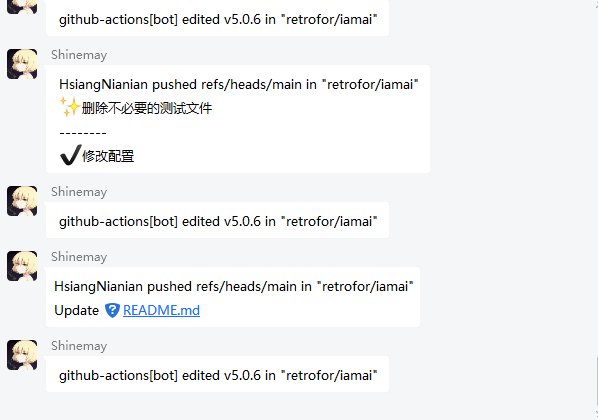
    "push": "{pusher[name]} pushed {ref} in \"{repository[full_name]}\"\n{commits[0][message]}",
    "release": "{release[author][login]} {action} {release[tag_name]} in \"{repository[full_name]}\"",
    "repository": "{sender[login]} {action} repository \"{repository[full_name]}\"",
    "status": {
		"success": "{sender[login]} set {sha} status to {state} in \"{repository[full_name]}\""
	},
    "team_add": "{sender[login]} added repository {repository[full_name]} to team \"{team[name]}\"",
    "watch": "{sender[login]} {action} watch in repository \"{repository[full_name]}\"(Total {repository[stargazers_count]} stargazers)"
}
参数说明
bot List 一个bot键,无实际用处。
bot.hash str 这是一个由插件自动生成的键值对,请勿更改,否则无法发送消息。
{
  "bot": {
        "hash": "43718c3b643*******ddfd95a0d013ae"
    }
}
settings List 存放一些基本配置的键。
settings.host str 连接的域。
settings.port str|int 连接的域的端口。
settings.path str 连接域的路径。
{
    "settings": {
        "host": "0.0.0.0",
        "port": "3000",
        "path": "/webhook"
    }
}
以上host``port``path组合便是0.0.0.0:3000/webhook。
sent List 发送消息的列表键。
sent.private List 发送私聊消息的列表键。
sent.group List 发送群聊消息的列表键。
{
    "sent": {
        "private": [
            2753364619
        ],
        "group": [
            971050440,
            10005856
        ]
    }
}
以上参数代表有事件接收时将会发给QQ用户2753364619以及群聊971050440和10005856。
其余键,均为Github Repo Webhook发送的事件名称,具体可参考Webhook events and payloads。
表达嵌套关系均用xxx[xxx][xxx]表示。
消息事件
所有webhook事件的handle都由以下两部分组成
@webhook.hook(event_type)
def on_member(data):
    logg(json.dumps(data))
    repost(obj=config[event_type], dic=data)
该函数被写在main.py的Event.init(plugin_event,Proc)中,其中event_type是具体的事件,比如push,star.created。
{
    "event_type": "xxx"
}
这是配置文件config.json内的以事件名称为键、回复消息为值的一段json,若event_type为push,那么当push事件发生时会发送值到目标群/好友。它还允许有以下变体:
{
    "event_type": {
        "action1": "xxx",
        "action2": "xxx"
    }
}
这样填写后会在指定事件的指定行为发生后发送消息。
配置文件的值均用字符串表示,其中允许用{}代表webhook发送json的字段,允许使用[]索引下级键,比如{sender[login]}。
说明:对于暂时弃用的事件,可以在其事件名称前加一个_来屏蔽掉。
高级用法
这里用push事件的多个commits情况做举例。
原有配置只会通报最新的那个commit的标题,要想做到通报这次push时的所有commits,可以这样:
修改config.json,将尾部的通报最新commit标题参数删去。
{
"push": "{pusher[name]} pushed {ref} in \"{repository[full_name]}\"\n"
}
修改main.py内对应repost()函数,我们在这里添加一个string参数作为附加文本。
def repost(obj: dict, dic: dict,string: str = ""):
    try:
        if isinstance(obj,dict):
            for qq in config['sent']['private']:
                plugin_event.send("private", qq, obj[dic['action']].format(**dic)+string)
            for group in config['sent']['group']:
                plugin_event.send("group", group, obj[dic['action']].format(**dic)+string)
        elif isinstance(obj,str):
            for qq in config['sent']['private']:
                plugin_event.send("private", qq, obj.format(**dic)+string)
            for group in config['sent']['group']:
                plugin_event.send("group", group, obj.format(**dic)+string)
    except:
        pass
修改main.py内对应push事件的handle函数,给push事件添加一个由commits列表组成的字符串。
@webhook.hook("push")
def on_push(data):
	logg(json.dumps(data))
	string = '\n--------\n'.join([commit['message'] for commit in data["commits"]])
	repost(obj=config['push'], dic=data,string=string)
保存,重载,开启,完美输出。
协议
如果想进行一些不同action的个性化操作可以更改源码。
'''
     ██╗██╗   ██╗██╗   ██╗███╗   ██╗██╗  ██╗ ██████╗
     ██║╚██╗ ██╔╝██║   ██║████╗  ██║██║ ██╔╝██╔═══██╗
     ██║ ╚████╔╝ ██║   ██║██╔██╗ ██║█████╔╝ ██║   ██║
██   ██║  ╚██╔╝  ██║   ██║██║╚██╗██║██╔═██╗ ██║   ██║
╚█████╔╝   ██║   ╚██████╔╝██║ ╚████║██║  ██╗╚██████╔╝
 ╚════╝    ╚═╝    ╚═════╝ ╚═╝  ╚═══╝╚═╝  ╚═╝ ╚═════╝

    Licensed under the Apache License, Version 2.0 (the "License");
you may not use this file except in compliance with the License.
You may obtain a copy of the License at
    https://www.apache.org/licenses/LICENSE-2.0
    Unless required by applicable law or agreed to in writing, software
distributed under the License is distributed on an "AS IS" BASIS,
WITHOUT WARRANTIES OR CONDITIONS OF ANY KIND, either express or implied.
See the License for the specific language governing permissions and
limitations under the License.
'''
鸣谢
感谢 @仑质 对笨蛋的指点。